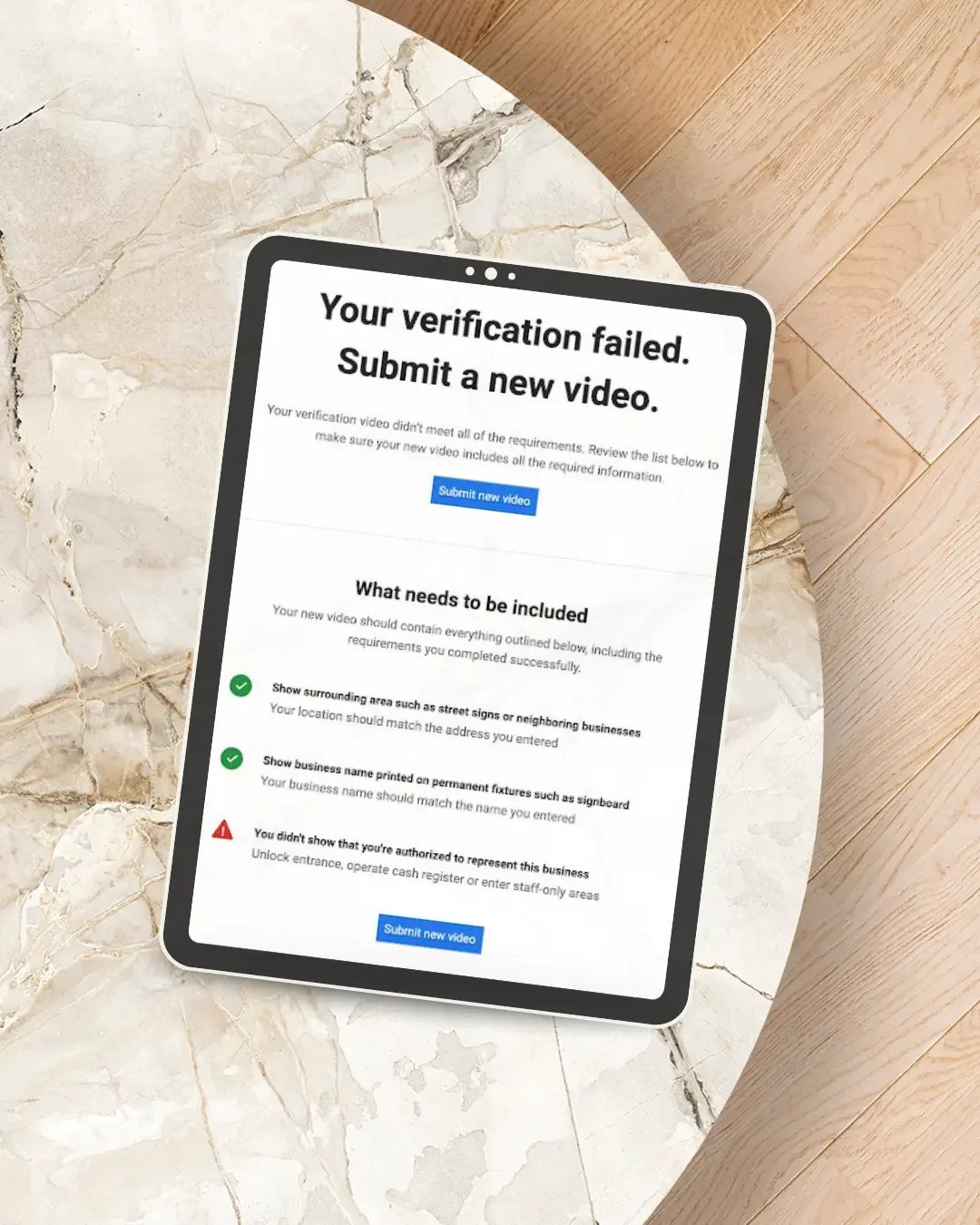
You followed Google's instructions, walked around your business with your phone, uploaded the verification video - and then Google rejected it.
So what went wrong?
If your Google Business Profile video verification failed, it usually means Google couldn't clearly confirm one or more of three things:
where your business operates
that the business genuinely exists
that you are authorised to manage or represent it
That doesn't necessarily mean your business isn't eligible for a Google Business Profile. Often, the video simply didn't provide enough evidence for Google to verify the information on the profile. Before recording the same video again, it is worth understanding exactly what Google is trying to verify.
What is Google Business Profile video verification?
Google uses verification to confirm that a business is genuine and that the person attempting to manage the Business Profile is authorised to do so. Depending on the business and profile, Google may offer different verification methods. Video verification has become one of those methods. Google determines which verification options are available to each Business Profile based on factors including the business type, public information, region and opening hours. You cannot simply choose whichever verification method you prefer.
If Google gives you Business video as your verification method, you need to record the video through the verification process on your mobile device. It isn't the same as recording a normal video on your phone and uploading it later. The recording needs to be live, continuous and unedited.
Why does Google Business Profile video verification fail?
There isn't one single reason. A video can look perfectly convincing to the business owner while still leaving Google unable to confirm something it needs.
The most common problems relate to location, business evidence and proof of management.
1. You didn't clearly show where the business is located
Google needs enough visual information to connect the business in your video with the location associated with the Business Profile. Simply filming inside an office, workshop or house may not provide that.
For a storefront or business customers visit, your video can include things such as:
the street
street signs
your building number
neighbouring businesses
recognisable surroundings
the exterior of your premises
Don't begin the video once you're already standing inside the business. Give Google context. Start outside and show enough of the surrounding area to establish where you actually are.
2. Your business signage wasn't clear
This is particularly important for businesses displaying a physical address where customers visit. Google's current video requirements for storefront and hybrid businesses call for the business name to appear on permanent signage such as a signboard, wall or window. The name should also match the business name shown on your Google Business Profile.
A temporary piece of paper printed with the business name isn't the same thing as permanent business signage. If the business doesn't have permanent on-site signage, that can also be a sign that the profile should not be configured as a storefront in the first place.
3. Your profile is set up as the wrong type of business
This is an important one, particularly for tradies and home-based service businesses. If customers do not visit your address and you instead travel to them, you will generally be operating as a service-area business for Google Business Profile purposes.
Examples might include:
plumbers
electricians
mobile cleaners
landscapers
mobile mechanics
some builders and contractors
If you're running the business from home but customers don't actually come to that address, you shouldn't be trying to prove that it is a customer-facing storefront. The verification evidence for a service-area business is different. Google allows service-area businesses to demonstrate where they operate using things such as nearby street signs or landmarks and to demonstrate that the business exists through work equipment, tools, branded materials and relevant business documentation.
Before attempting verification again, make sure the way your business is represented on the profile actually matches how the business operates.
4. You didn't show enough evidence that the business actually exists
Showing a building isn't always enough. Google also wants to see evidence of the real business operating behind the listing.
For a service business, that could include:
tools and equipment you genuinely use
machinery
your work vehicle
branded clothing
business cards
your workspace
products or stock
Think about what would make it obvious that this isn't simply an address someone has entered into Google. If you're a plumber, for example, showing your tools and work vehicle provides considerably more business context than filming your driveway. If you operate from commercial premises, show the actual working environment rather than only the front door.
5. You didn't prove that you manage the business
This is one of the easiest requirements to overlook. Showing that a business exists doesn't necessarily prove that you are authorised to manage it. Google therefore asks for evidence that wouldn't normally be available to a member of the public.
For a storefront, that could involve:
unlocking the business
accessing an employee-only area
opening a storage area
accessing a cash register
using a point-of-sale system
For a service-area business, you might show yourself accessing business-only assets, opening your work vehicle or showing appropriate business documents. The goal is to establish that you're not simply standing outside somebody else's business recording a video.
6. Your business name doesn't match
Consistency matters. For storefront verification, Google specifically requires the business name shown on permanent signage to match the name on the Business Profile. That can become a problem when businesses have added unnecessary words to their Google Business Profile name for SEO.
For example, a business legitimately trading as:
Smith Plumbing
shouldn't create a profile called:
Smith Plumbing | Best Plumber Brisbane Emergency Plumbing
just because those are desirable search terms.
Your Google Business Profile should accurately represent the real-world business. If the information you're trying to verify doesn't match the business Google can see, verification can become much harder.
7. You recorded the video incorrectly
There are also technical requirements.
Google currently requires a verification recording to be:
recorded live
one continuous recording
unedited
at least 30 seconds long
recorded and uploaded from a mobile device through your Business Profile
You can't piece several clips together. You also can't prepare a polished video in advance and upload it from your camera roll. This isn't marketing content. The purpose is simply to provide Google with enough evidence to verify the business.
What should you show in a Google verification video?
The best approach is to plan your route before pressing record. What you show depends on whether you operate a storefront/hybrid business or a service-area business.
If customers visit your business location
A useful sequence might be:
1. Start outside
Show the street, building number, neighbouring businesses or other location identifiers.
2. Show your permanent signage
Make sure the business name is clearly visible.
3. Enter the premises
Unlocking the premises can also help demonstrate your access.
4. Show the business operating environment
Show the reception, workspace, stock, equipment or other relevant business areas.
5. Demonstrate management access
Show something that a normal customer couldn't access.
The recording should tell a simple visual story:
This is the location. This is the business. I have authority to operate it.
If you're a service-area business
You don't need to turn your home into a fake storefront.
Instead, you might show:
1. Your location
Film nearby street signs, building numbers or identifiable landmarks around the address from which the business operates.
2. Your work equipment
Show genuine tools, machinery, equipment, products or workspace used by the business.
3. Your business identity
Branded vehicles, business cards or other genuine business materials can help.
4. Proof that you operate the business
Show access to your work vehicle, equipment or appropriate business documentation that matches the business name.
Again, the objective is to connect the location, business and person managing it.
What should I do after my Google verification video is rejected?
Don't immediately record exactly the same video again. First, open your Business Profile and look for Review issues. Google advises that when a video isn't accepted, the profile may identify what was missing.
Examples Google currently gives include:
the business name wasn't visible on the storefront
the nearby area wasn't shown
proof of authorisation to operate the business was missing
Use that feedback to plan the next recording. Your replacement video should still include the evidence you showed previously plus the information Google identified as missing. Google says review after completing verification can take up to five business days, so a profile not being verified immediately doesn't automatically mean the submission has failed.
Can I choose another verification method?
Not necessarily. This causes a lot of frustration because business owners may see advice online telling them to simply request an email, phone call or postcard instead.
Google currently states that verification methods are automatically determined and can't be changed manually.
Depending on your profile, you might be offered:
phone or text
email
video recording
live video call
mail/postcard
But not every method is available to every business. If your profile displays another verification method, you can use an option Google has made available. If it doesn't, you generally can't simply demand a different one.
What if Google keeps rejecting my verification video?
If you've carefully followed the requirements and verification continues to fail, avoid repeatedly submitting videos without investigating the underlying issue.
Check:
Is the business actually eligible for a Google Business Profile?
Is the address represented correctly?
Should the business be a storefront, hybrid or service-area business?
Does your business name match your real-world branding?
Is your permanent signage sufficient where required?
Are you clearly showing the surrounding location?
Are you showing genuine business equipment or operations?
Are you demonstrating that you're authorised to manage the business?
If those elements are correct and you're still unable to verify the profile, use another verification method if Google offers one. Google also advises businesses that still cannot complete verification to contact Google Business Profile support.
Don't create another Google Business Profile just because verification failed
One thing I wouldn't recommend is immediately creating another listing and starting again. If a legitimate profile already exists, creating another one can introduce an entirely different problem: duplicate Business Profiles.
The better approach is to identify why the existing profile isn't being verified and resolve that issue. Verification problems can be frustrating, but creating additional profiles usually doesn't solve the underlying problem.
Frequently Asked Questions
How long does Google Business Profile video verification take?
Google advises that the review process can take up to five business days after you complete the verification process.
Can I upload a video I've already recorded?
No. Google requires the video to be captured live through the Business Profile verification process. It must be an unedited, continuous recording rather than a pre-recorded video.
How long does the Google verification video need to be?
Google requires the recording to be at least 30 seconds long. There is little benefit, however, in making the video unnecessarily long. Focus on clearly showing all of the evidence Google requires.
Do I need signage for Google Business Profile verification?
For a storefront or hybrid business displaying an address where customers visit, Google expects permanent on-site signage with the business name clearly displayed. If customers don't visit your business at its address, your business may need to be set up as a service-area business instead.
Can a home-based business pass Google video verification?
Yes, provided the business is eligible for a Google Business Profile and represented correctly. For a service-area business operating from home, Google recommends showing identifiers around the location as well as business equipment and evidence that you manage the business.
Why does Google keep asking me to verify again?
Google may request re-verification after changes to business information or when it needs additional evidence that the information on a profile is accurate.
Can someone else verify my Google Business Profile for me?
Google verification needs to demonstrate that the person completing it owns or is authorised to represent the business. If you're working with someone who manages your Google Business Profile, the verification process still needs genuine evidence from the actual business.
Still stuck with Google Business Profile verification?
Google Business Profile issues aren't always straightforward. Sometimes the failed video is the problem. Other times, the verification failure is actually revealing an issue with the profile itself - the address, business type, name, ownership or the way the business has been configured.
NQ Social Collective provides Google Business Profile help to businesses across Australia, including profile setup, optimisation and troubleshooting when something isn't working the way it should.
Rather than repeatedly changing things and hoping something works, I look at the wider setup and identify what may be preventing the profile from progressing.
Explore Google Business Profile Help →
Continue Reading
If this article was helpful, you may also like to read more about:
How Often Should You Update Your Google Business Profile?
Do You Need a Website If You Already Have a Google Business Profile?
Why Your Website & Google Business Profile Must Work Together