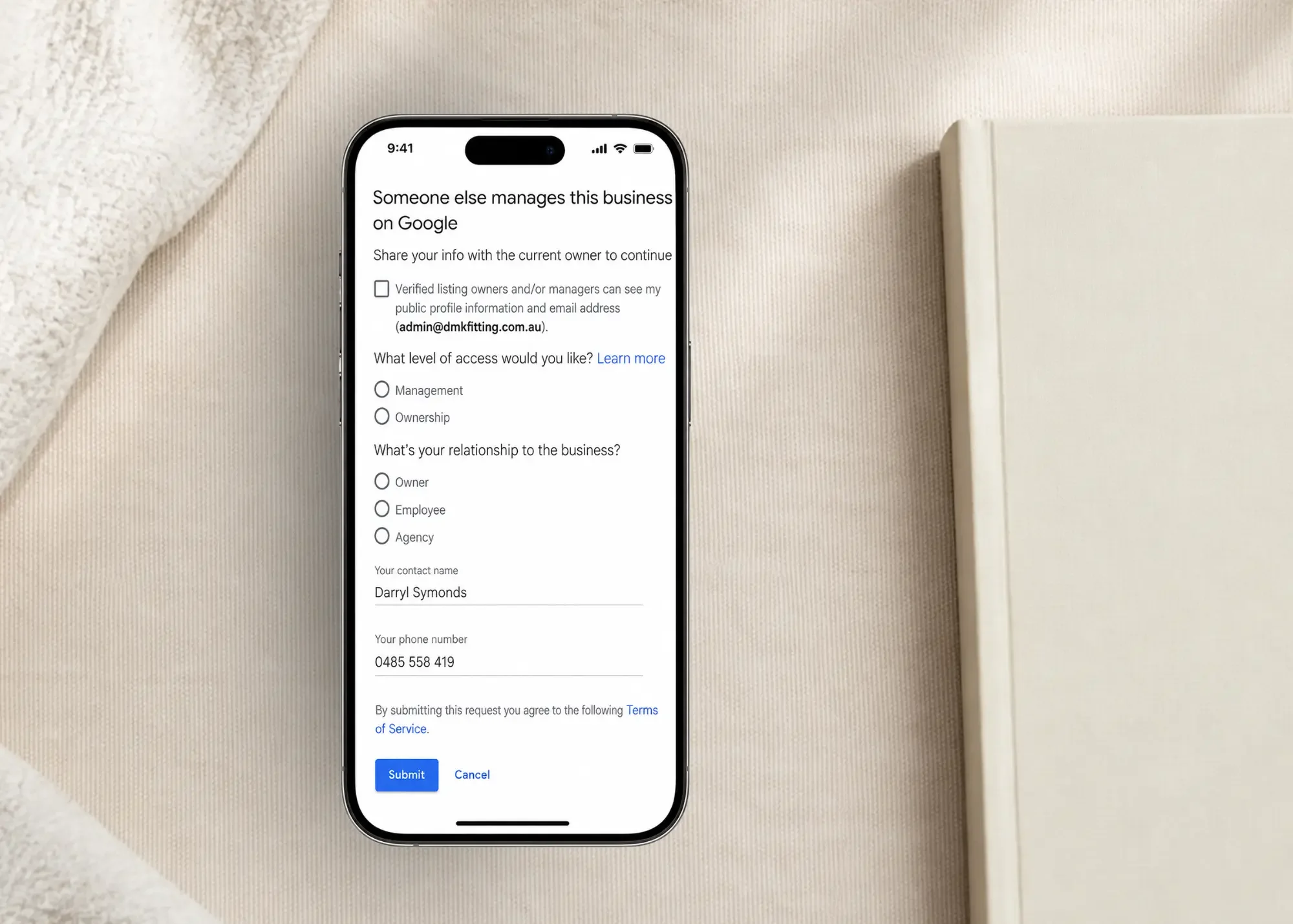
You search for your business on Google, find the listing, and then realise something is wrong. Someone else appears to own or manage your Google Business Profile.
It might be:
a former employee
an old marketing company
a previous business owner
a website provider
a family member
an email account nobody in the business recognises
For many small businesses, this only becomes obvious when they need to update the listing, add a new manager or fix a problem. The important thing is not to immediately create another Google Business Profile. If the existing profile genuinely represents your business, there may be a way to request access to it.
Can someone else own my Google Business Profile?
Yes. A Google Business Profile can have a primary owner, additional owners and managers. That means the person currently controlling your listing may not necessarily be the business owner today. The profile may have been set up years ago by someone who worked for the business at the time, or by a previous agency or provider. The listing can still look completely normal to customers while the ownership setup behind the scenes is outdated.
Why would someone else own my business profile?
There are a few common reasons.
A former employee set it up
A staff member may have created the profile using their own Google account and then left the business. Nobody thinks to update the ownership, and the issue only becomes obvious years later.
A marketing agency or website provider created it
An agency, consultant or web designer may have set up the profile for the business. That is not necessarily a problem. The issue is when the business itself was never given the right level of access.
The business changed hands
If a business has been sold, the previous owner may still be connected to the profile. Google Business Profile access can sometimes be overlooked during a business handover.
Nobody remembers which account was used
For established businesses, the profile may simply be connected to an old or forgotten Google account. That does not automatically mean someone has taken over the listing.
First, check whether you already have access
Before requesting ownership, check the Google accounts that may have been used for the business.
This could include:
your current business email
old Gmail addresses
another director's account
administration emails
previous staff accounts
accounts used by marketing providers
Search for your business while signed into each likely Google account. You may discover that one of them already has access. If you do, check the People and access section to see whether you are listed as an owner or manager.
Owner vs manager: what's the difference?
This is where many businesses get confused.
A manager can handle many day-to-day tasks on a Google Business Profile.
An owner has broader control.
A primary owner has the highest level of ownership authority.
So being able to edit your Google Business Profile does not always mean your business is the primary owner. That matters if a former employee, previous provider or old business owner still holds the main ownership access.
How do I request ownership?
If Google indicates that another account manages the profile, an authorised business representative can request access.
The general process is:
Find the existing Google Business Profile.
Select the option to request access.
Complete the ownership request.
Submit it to the current owner.
The current owner is then given an opportunity to respond. If the profile genuinely belongs to your business, this is usually a better starting point than creating another listing.
What happens after I request access?
There are three main possibilities.
The current owner approves it
If the request is approved, you can gain access to the existing profile.
Once that happens, check:
who the primary owner is
who the other owners are
who the managers are
whether anyone still has access who no longer needs it
Do not assume that being added automatically makes your business the primary owner.
The current owner ignores it
If the request is not answered, Google may provide additional options depending on the profile and circumstances. You may be asked to continue with verification or provide further information.
The current owner denies it
A denial does not always mean the issue is finished. Google may provide further options depending on the situation. Before doing anything else, make sure you can clearly demonstrate your connection to the business and that the profile genuinely represents it.
What if an old employee still owns it?
If you can still contact them, the simplest solution may be to ask them to add the correct business-controlled Google account as an owner. From there, the ownership structure can be corrected. If you cannot contact them, you may need to use Google's ownership request process. Once it is fixed, make sure the business itself retains appropriate ownership access.
What if my previous agency owns it?
Start by asking the agency or provider to review the profile access. In many cases, this is simply an account-management issue rather than a dispute. Ask them to add the appropriate business-controlled account as an owner. If they are no longer contactable or will not cooperate, the formal Google ownership process may be necessary. Your agency can help manage your Google Business Profile. But your business should not become locked out of it when that relationship ends.
Should I create a new Google Business Profile instead?
Usually, no. If an existing profile already represents the same business, creating another one can lead to duplicate-profile problems.
You could end up with:
two versions of the same business
reviews split across listings
conflicting contact details
uncertainty about which profile Google should display
If the current listing is legitimate, recover or request access to it first.
What if I have manager access but not ownership?
This is worth checking. Manager access can make everything appear fine because you can still update parts of the profile. But if someone else remains the primary owner, your business may still be dependent on another person's account. Where possible, the business should maintain appropriate ownership access itself.
How can I prevent this happening again?
Once the ownership issue is resolved:
make sure the business has an appropriate owner account
confirm who the primary owner is
remove users who no longer need access
add staff properly rather than sharing passwords
include Google Business Profile access in employee and agency handovers
keep a record of who controls your major online assets
A few minutes spent checking this now can save a lot of frustration later.
Frequently Asked Questions
Why does Google say someone else manages my Business Profile?
It usually means another Google account already manages the verified profile. That account may belong to a current or former employee, agency, previous owner or another authorised person.
Can I request ownership if someone else controls my listing?
Yes. If you are authorised to manage the business, Google provides a process for requesting access to an existing Business Profile.
Can there be more than one owner?
Yes. A Google Business Profile can have a primary owner, additional owners and managers.
What if I don't recognise the current owner?
Check whether the account may belong to a former employee, previous owner, agency or provider. If you still cannot identify it, use Google's ownership request process if you are authorised to manage the business.
Should I delete the existing profile?
Usually not before you fully understand the ownership situation. Creating or deleting profiles too quickly can make the issue harder to fix.
Need help working out who owns your google business profile?
If someone else appears to control your Google Business Profile, the first step is understanding the access setup before making changes.
NQ Social Collective can help you review:
who appears to manage the profile
what level of access you currently have
whether another owner is still connected
whether there is a duplicate listing
what your next step should be
NQ Social Collective provides Google Business Profile help to businesses throughout Australia.
Get Google Business Profile Help Australia →
Google Business Profile is a Google product. NQ Social Collective is an independent business and is not affiliated with or endorsed by Google.
Continue Reading
How Do I Recover Access to My Google Business Profile?
Google Business Profile Verification Problems in Australia (And How to Fix Them)
Can You Create a New Google Business Profile After Suspension?
Why Your Website and Google Listing Need to Work Together
Google Business Profile Help Optimisation →